
EVOLVE Dynamic Traffic Controller | ESX • QB • QBX
🚦 EVOLVE Traffic Controller
Advanced Real-Time Traffic & Pedestrian Management for FiveM
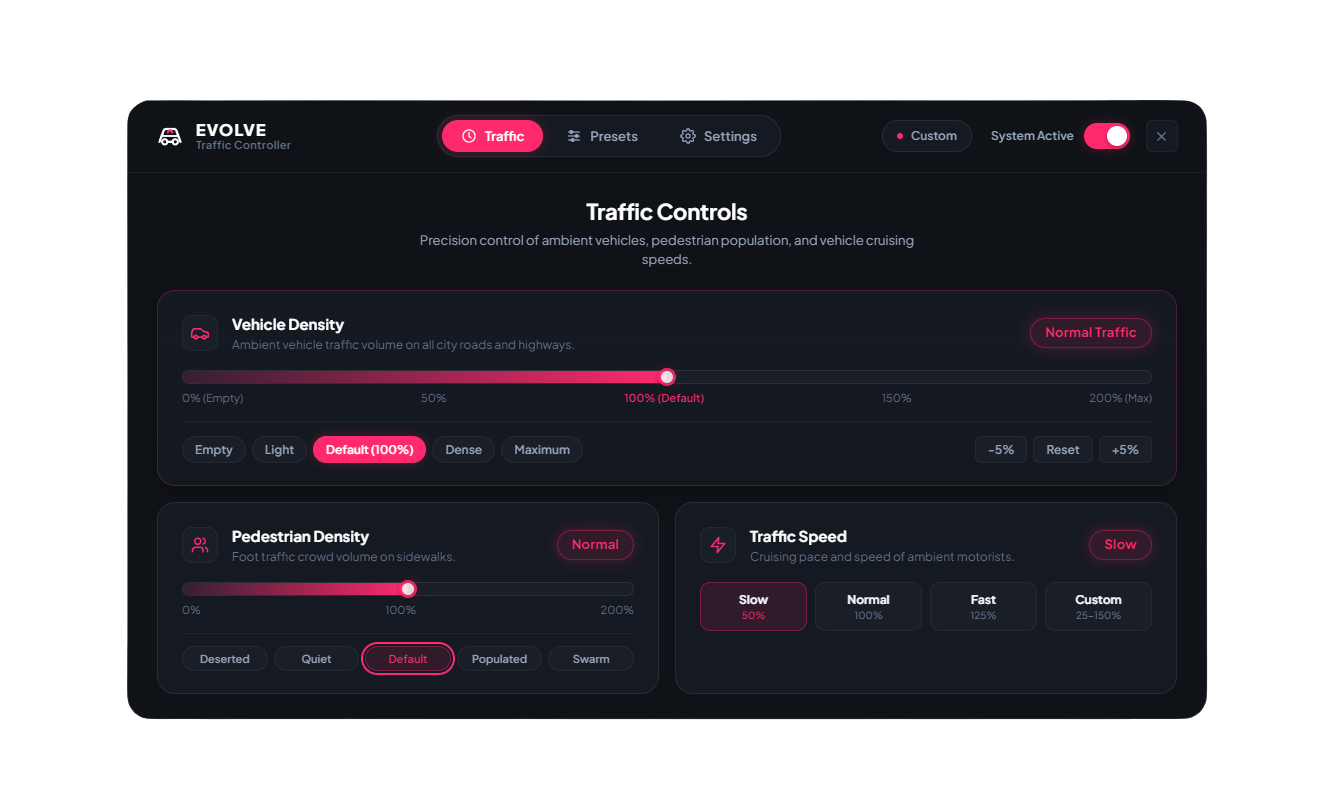
Take complete control of your server’s atmosphere with EVOLVE Traffic Controller — a lightweight, highly optimized traffic management system designed to give server owners full control over vehicles, pedestrians, ambient traffic speed, and overall city population in real time.
Whether you want empty streets for racing events, reduced traffic for better performance, realistic everyday population levels, or packed rush-hour traffic, EVOLVE Traffic Controller lets you change everything instantly without restarting the resource or server.
✨ FEATURES
🚘 Real-Time Vehicle Density Control
Adjust ambient vehicle traffic from 0% to 200% directly from the interface.
Create anything from completely empty roads to heavily populated city traffic within seconds.
🚶 Pedestrian Density Control
Control pedestrian population independently from vehicle traffic.
Set sidewalk and ambient pedestrian density anywhere from 0% to 200%.
⚡ Ambient Traffic Speed Control
Fine-tune the behavior of NPC traffic with adjustable ambient vehicle speed.
Configure speeds from approximately 25% to 150% depending on the atmosphere you want to create.
Player vehicles and protected entities are kept separate from normal ambient traffic handling.
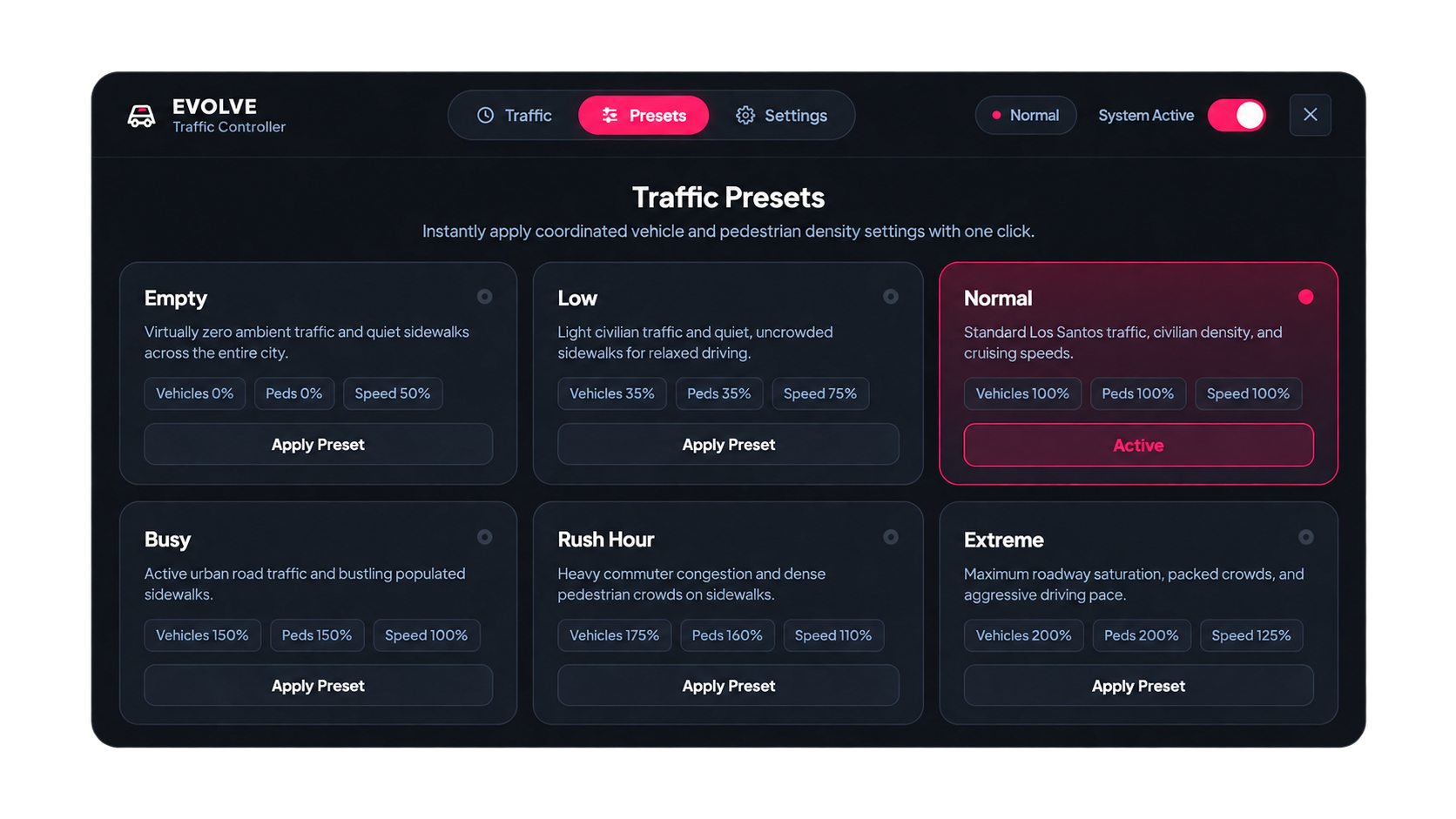
🎛️ QUICK TRAFFIC PRESETS
Switch between professionally configured traffic profiles instantly:
- Empty — Clear streets for racing, drifting and cinematics
- Low — Reduced population and lighter traffic
- Normal — Balanced everyday Los Santos traffic
- Busy — Increased city activity
- Rush Hour — Heavy roads and populated sidewalks
- Extreme — Maximum traffic and pedestrian density
You can also manually fine-tune every value whenever you need more precise control.
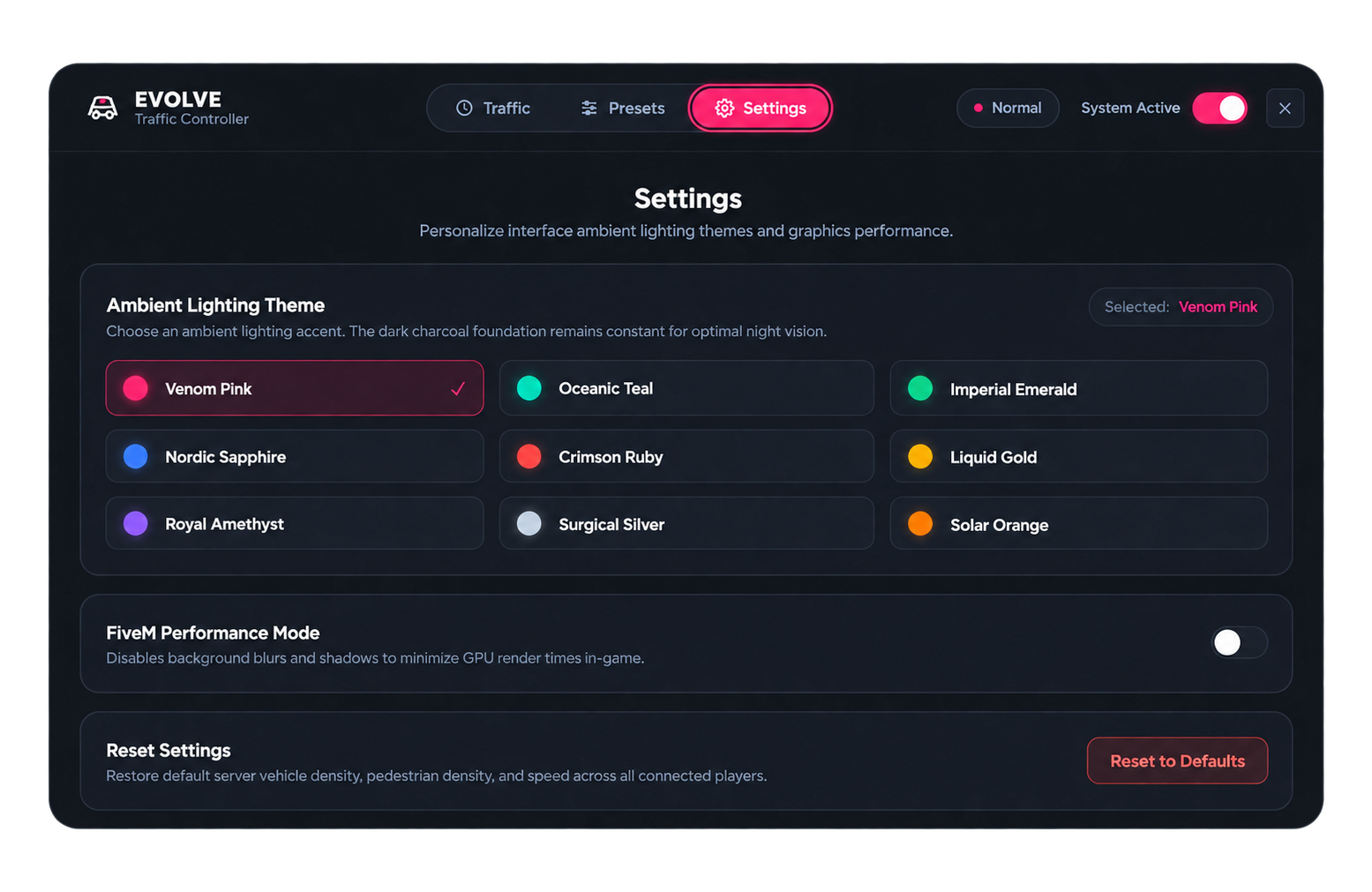
🎨 PREMIUM MULTI-THEME UI
EVOLVE Traffic Controller includes a modern, responsive interface designed to feel like part of a premium FiveM resource rather than a basic admin menu.
Includes 9 selectable color themes:
💗 Venom Pink
🌊 Oceanic Teal
💚 Imperial Emerald
🔷 Nordic Sapphire
❤️ Crimson Ruby
🏆 Liquid Gold
💜 Royal Amethyst
⚪ Surgical Silver
🔥 Solar Orange
Your community branding can also be customized through the configuration.
✨ SMOOTH POPULATION TRANSITIONS
Reducing traffic doesn't have to feel abrupt.
The system is designed to provide smoother population changes when density is lowered, helping avoid the harsh feeling of vehicles and pedestrians suddenly disappearing around players.
🖥️ PERFORMANCE MODE
For communities focused on maximum FPS and low-spec PC compatibility, the UI includes a dedicated Performance Mode that reduces unnecessary visual effects such as heavier blur and glow rendering.
⚡ HIGHLY OPTIMIZED
Performance was one of the main priorities when developing EVOLVE Traffic Controller.
Typical Client Resmon:
~0.02ms during normal operation
Occasional ~0.03ms spikes
No unnecessary background database queries and no heavy entity spawning systems.
The resource works directly with GTA/FiveM population systems to keep overhead extremely low.
🔄 REAL-TIME SYNCHRONIZATION
Traffic settings can be changed while the server is running.
✅ No server restart
✅ No resource restart
✅ No player reconnect
✅ Instant traffic adjustments
Changes can be applied immediately across the server.
🔐 ADMIN CONTROL & SECURITY
Traffic management access is protected using server-side validation and configurable permissions.
Includes support for:
- FiveM ACE permissions
- Framework administrator permissions
- Request validation
- Anti-spam protection
- Configurable access controls
💾 NO DATABASE REQUIRED
EVOLVE Traffic Controller does not require MySQL.
Settings can be stored using lightweight JSON persistence, keeping installation simple and avoiding unnecessary database overhead.
🔧 FRAMEWORK SUPPORT
Designed for compatibility with:
✅ Standalone
✅ ESX Legacy
✅ QBCore
✅ Qbox
Notification support can also integrate with supported framework systems and ox_lib configurations.
🛠️ CONFIGURATION
Server owners can configure important parts of the resource, including:
- Default traffic settings
- Vehicle density
- Pedestrian density
- NPC traffic speed
- Permission settings
- Framework integration
- Notifications
- UI branding
- Community logo
- Themes
- Performance options
- Preset behavior
📊 PERFORMANCE AT A GLANCE
Client Resmon: ~0.02ms
Typical Spike: ~0.03ms
SQL Usage: None
Database Required: No
Framework: Standalone / ESX / QBCore / Qbox
Real-Time Adjustments: Yes
Multi-Theme UI: Yes
Traffic Presets: 6
Vehicle Density: 0%–200%
Pedestrian Density: 0%–200%
📦 WHAT YOU GET
✅ EVOLVE Traffic Controller Resource
✅ Premium Traffic Management UI
✅ 9 UI Themes
✅ 6 Traffic Presets
✅ Vehicle & Pedestrian Density Control
✅ Ambient Traffic Speed Control
✅ Performance Mode
✅ Framework Compatibility
✅ Configurable Branding
✅ Installation Instructions
✅ Configuration Files
💎 CONTROL THE PULSE OF YOUR CITY.
From silent midnight streets to packed rush-hour traffic, EVOLVE Traffic Controller gives your server the flexibility to create the right atmosphere at any moment — without sacrificing performance.
EVOLVE Development
Premium FiveM Resources Built with Performance in Mind.
Instant
Ready to use
Secure
Escrowed
Updates
Lifetime access